
The TikTok guide: in this lesson you will find everything you need to know about TikTok. What it is and how do you use TikTok? How do you do marketing on TikTok? How do you make entertaining videos? Why does TikTok matter? What are this platform’s main features? There is plenty to cover in this lesson of your favourite TikTok Academy.
This is the fourth lesson of the TikTok Academy. After the first three lessons on what TikTok is, how to create an account and how to grow your followers, this lesson is the complete guide to TikTok.
Let’s get straight into this new lesson.
Want your TikTok profile to take off?
Want to land collaborations on TikTok?
Want to grow your TikTok followers?
Want to make money on TikTok?
Want to turn your TikTok around?
We can help.
What is TikTok?
TikTok is a Chinese social media app, available on Android and iOS, that lets people easily create and share short videos of 15 to 60 seconds.

Free to use image from Google Images
What sets it apart is the ability to add music, filters and effects to videos from a huge database the app provides free of charge.
That has made TikTok the most widely used short video streaming platform in the world. With more than 500 million monthly active users and steady growth, the app is starting to snap at the heels of better-established platforms such as Facebook and Instagram.
Owned by the Chinese tech company ByteDance, TikTok’s growth coincides with its merger with the well-known lip sync app Musical.ly at the end of 2018. The app is particularly well known, used and loved by Generation Z, but recently it has also started drawing brands, which see it as a new marketing channel.
For more, read our post: What TikTok is and how it works
Image from https://www.inverse.com/
TikTok: basic terms, characteristics and features
Here is an introduction explaining the terms we will use and TikTok’s characteristics and features.
Basic terms
To understand what TikTok is and how to use it, it helps to briefly describe some basic terms that come up throughout this page.
Duets: an important feature that lets one user collaborate with another. You can duet with someone who has given permission, and it is always up to them who may duet on their videos. To change those permissions, visit the privacy and safety settings.
Reactions: reaction videos are another important feature. You can share your surprise, emotion or other feelings on watching a video with the community. As with duets, this feature requires the other user’s permission.
Cringe videos: cringe videos are a particular type that pull in millions of views. In them, someone unintentionally does something embarrassing during a performance. On YouTube there are compilations made for laughs, and others made to mock.
Challenges: the challenge is one of the most-used features on TikTok. Challenges vary widely and are sometimes eccentric, like the stair dance, and they often set trends and build a sense of belonging within the community. Sometimes they also take the form of sponsored hashtags.
Main characteristics
The “For You” feed
Image from guidingtech.com
The “For You” feed works like a home page, so it is where people land as soon as they open the app. It is also where TikTok’s algorithm and the artificial intelligence behind it recommend new videos based on the kind of user you are, the creators you watch and the content choices you have made before.
Menu bar
The menu bar at the bottom of the screen carries 5 icons with different, important functions:
Image from TikTok App
- The first icon, shaped like a house, refreshes the page and brings up newly recommended videos.
- The second, the magnifying glass, searches for any user or video.
- The third, (+), lets you create a video or upload one from your gallery.
- The fourth, the message icon, opens your notifications.
- The fifth and last, the person icon, opens your main page, where you can edit your profile, view your videos and make other changes.
On the right of the screen and above the menu bar there are other icons with their own functions, which we will come to later.
First, let’s take a general look at some of the app’s other characteristics.
Videos
The company’s mission is “to let anyone in the world freely express their imagination and knowledge in whatever way and at whatever time suits them best”. So on TikTok you can find any kind of video: art, theatre, fitness, cars, memes and more — though the most popular are the musical ones.
Creators
These are users named for their ability to shape experiences and engage the community with unique, creative videos. Following some of the most popular creators is also a way for people to get a sense of what else is out there. No list can cover every niche on the app, but it is worth considering a whole range of categories, some of which we list here.
- Mia (@mmiiaax): a comedian and lifestyle creator on YouTube
- James Henry (@jameshenry): another comedian and YouTube creator who often collaborates with tiktokers
- Pepperoni Joe (@pepperonijoe): a comedian known for his duets with major TikTok celebrities
- Zoe is your Homie (@zoeisyourhomie): known for her duets and ironic videos
- Juicy (@juiceesaft): a comedian who quickly became a major creator on TikTok
- the dark knight (@drkknght2113): a comedian who often jokes about everyday life
- Ashton Hooper (@manofashton): an actor who performs scenes from films and cartoons
Hashtags and challenges
Hashtags are fundamental on TikTok. Tapping hashtags, particularly the ones that grow around challenges, is a simple way to find out what people use to get into the For You section. Many videos include a #ForYou hashtag in the hope of landing on that page.
Privacy
TikTok accounts are public by default when people sign up. The app does make it easy to set your account to private if you don’t want all your videos public. Going private still lets people see your username if they search for it, but they will have to request to follow you before they can see, like or comment on your videos. Making your account private is a good way to make sure only your friends can see what you post, but it also removes some of the core features that make TikTok what it is. People with private accounts cannot duet, for instance, which may limit how much they can take part.
Notifications
Push notifications are mostly irrelevant and often designed to get you to open the app. If you don’t use it for a while, TikTok will send you messages saying plenty has happened since you last opened it. Push notifications can be turned off if you prefer.
Reporting
This feature helps make sure everyone respects the community guidelines. Users are encouraged to report profiles, videos, chats and content containing harassment, offensive behaviour and comments, or inappropriate material that may cause distress. Together with the community guidelines, reporting exists to keep users safe.
Features
Now that we have covered what TikTok is, let’s look at its main features. Beyond lip sync, TikTok offers a whole set of other useful features, including these:
- emoji stickers and face filters;
- editing tools for trimming, joining and duplicating video clips easily;
- ready-made videos (dance, magic tricks and comedy, vlogs, sport, DIY and animals) to work with;
- adding music or sounds to your videos free of charge from a wide selection of sounds and song clips;
- adding transitions, special and virtual effects and filters to videos, with designs constantly refreshed;
- recording your “reactions” to videos and sharing them;
- a reminder that warns users when they have spent more than 2 hours on the app.
Want your TikTok profile to take off?
Want to land collaborations on TikTok?
Want to grow your TikTok followers?
Want to make money on TikTok?
Want to turn your TikTok around?
We can help.
How to use TikTok
You don’t have to register to have a TikTok account and use the app. Registering, though, lets you follow other users and make videos.
How to create a TikTok account
Here are the steps to create an account on TikTok.
Step 1 – download and install
First download the latest version of the app from the Play Store or the Apple Store. Once installed, open the app by tapping its icon.
Step 2 – signing up and setting up the profile
The app opens a feed of recent or popular videos; tap any video to bring up the sign-up form. Now register using one of these options: phone, email or social network (Facebook, Instagram, Twitter or Google) and follow the prompts. Once the account is created, tap the icon at the bottom right of the screen to edit your profile.
For a step-by-step guide, read the TikTok Academy lesson: How to create a TikTok account on Android and iOS
How to find videos and comment and share
Browse the video feed
Once your profile is set up, go back to the first tab, which shows the video feed.
You will probably feel overwhelmed by the endless stream of videos on your home page.
TikTok shows recommended videos and videos from the musers you follow. As you start following and interacting with more people, TikTok’s algorithm makes your feed more personal to your interests.
Like, comment on or share the videos you enjoy
Image from TikTok App
Scroll the suggested videos and tap the username on the ones you like.
When you find a video you like, tap the heart icon to show it. That automatically builds a collection of your favourite videos inside your profile so you can watch them again later.
If you prefer, tap the speech-bubble icon to comment on it.
To share the video, tap the forward arrow under the comment symbol to bring up the sharing options. All these symbols sit on the right-hand side of the screen.
Searching for videos
Tap the second tab or use the magnifying glass to open the app’s search area.
In either you can search for accounts or videos, or use the search bar at the bottom to find videos by trending subject.
Image from blog.hubspot.com
Follow users through videos, search and TikCode
If you want to follow your favourite creators or users, tap the icon carrying their profile picture — it is the (+) sign above the heart icon on their video.
If you already know the account, you can search for it in the search bar under the “Users” filter.
And if you know their TikCode, go to the search bar and tap the icon on the right to start scanning the code.
Image from TikTok App
Within seconds you land on that person’s profile.
If you have a screenshot of a code, you can also tap “Photos” at the top of the scanning page to upload and scan the code.
And here is how to find your own TikCode to share with other users:
How to make a video on TikTok
Making a video on TikTok is extremely simple
Step 1 – once you are logged in, tap the “+” button on the menu bar at the bottom of the screen. If this is your first time recording, tap “ok” to let TikTok use your camera and microphone.
Step 2 – the recording and editing interface opens, where you can set the timer, speed, beauty effects, filters, transitions and other special effects; then press and hold the red button to start shooting. Here is a short description of the settings mentioned above
- Speed: records the video in slow motion or sped up.
- Beauty filter: an AR filter for correcting or hiding blemishes.
- Filters: changes the camera’s colour filter.
- Timer: sets a countdown for automatic recording if you want to film hands-free.
- Flash
Image from techjunkie.com
Note: the interface also lets you upload an existing video from your gallery
Step 3 – tap “music/add music” and choose the track you want to use. You can search the database for a specific song, but watch the copyright. Tapping the “play” icon previews the track you picked.
Step 4 – once you have chosen the track, tap the red “Use this sound and start filming” option under the song to use it.
Step 5 – tap the record icon and start filming. Remember you can flip the camera by tapping the circled arrows at the top right of the screen. To pause or end recording, tap the usual red square inside a circle.
Step 6 – tap the red tick at the bottom right of the record button to save the video and open the editing page.
Image from TikTok
How to edit videos on TikTok
Once the video is recorded you can do a final edit, in which you can:
- change the track you chose
- adjust the volume
- trim the sound
- decide where the track starts
- add stickers and other special effects
- add text and hashtags
Image from techjunkie.com
After saving the video you land, as we saw, on the post-editing page. Let’s go through the icons on that page and what they do:
- Select sound: opens the audio interface and imports music or sounds from the TikTok library, exactly as on the previous screen.
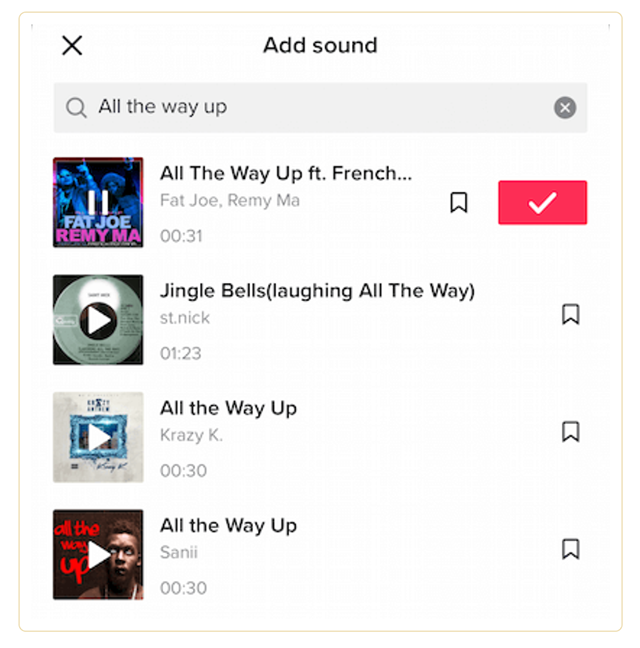
Image from TikTok
- Effects: this button opens a library of different effects along with a video timeline, so you can apply effects to parts of the video only.
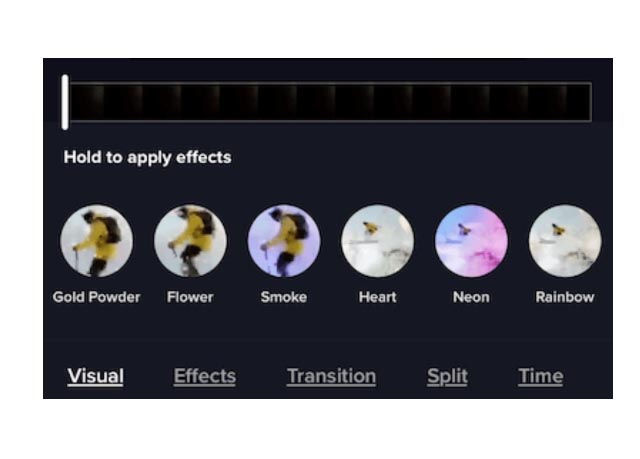
Image from TikTok
- Set cover: lets you pick a representative frame from your video as its cover, which other users see while browsing.
- Filters: applies a filter to the whole video segment, exactly as in the pre-recording interface.
- Stickers: opens the sticker library for adding animated stickers to the video. Once a sticker is selected, you can drag it across the screen to change where it appears during playback.
Image from TikTok
- Next: takes you to the publishing interface.
Unfortunately, once your video has been posted to TikTok, no further edits are possible except with a professional video editing tool such as FlexClip.
Related articles:
- how to go live on TikTok
- how to do transitions on TikTok
- how to do slow motion on TikTok
How to post videos on TikTok
As we saw, once the final edit is done and you have tapped “next” you land on the publishing page. Before publishing you can write a caption, add relevant hashtags and adjust the sharing and privacy settings.
You can also turn comments on or off, allow duets or reactions, and tap “save to album” to download the video to your phone’s photos.
If you are not ready to publish, tap the “drafts” button at the bottom left to save it for later.
We know hashtags matter a great deal, so it is worth picking the right ones for your videos. Among the most used are #foryou and #foryoupage, since people hope these will land them on TikTok’s For You feed.
To post your content, just tap the “post” button.
Image from socialmediaexaminer.com
How to advertise on TikTok
ByteDance has not yet built a profitable system (though it will soon) and only started testing its own advertising format with web agencies in the USA and Europe in January 2019.
Its site does, however, carry a page (click here) where marketers can create their own TikTok Ads.
For more detail, read our post: How to advertise on TikTok
Tips on becoming popular on TikTok
Here are some suggestions to help you create unique, engaging posts and become popular on TikTok:
- special effects: the app offers plenty of effects, so experiment and be creative
- music: most videos on the platform are musical, so lean towards the hits trending at the moment
- humour: people come to this platform to enjoy themselves, so be entertaining
- hashtags: include relevant hashtags in your captions so the video pulls people in
- competitors: watch what other users and brands are doing
Related articles: How to grow your TikTok followers
Conclusion
In this lesson of your favourite TikTok Academy we presented our TikTok guide. You now have everything you need to understand exactly what TikTok is and how to use it, marketing included. As you have seen, more and more brands are weighing up a presence on this app, so it is certainly a road worth taking.
Stay tuned and keep following us: in the next TikTok Academy lessons we will go deeper and cover other very interesting things…
Want TikTok consultancy? Get in touch — we will work out the best strategy for reaching your goal.
Want to sharpen your TikTok knowledge? Get in touch — we will find the course that fits you.
Want to ask us something or just talk? Get in touch — that is what we are here for.