
What is the SERP? It isn’t a trivial question — we use it every day without knowing the name.
SERP stands for “Search Engine Results Page”: it’s the Google results page that appears once you’ve typed a query (a question, phrase or word you need information about).
The SERP is made up of several parts:
- Snippet: a snippet is each individual result appearing on the Google results page.
- Paid results: the first and last four results appearing in the Google SERP.
- Organic results: the results you find right below the first four paid ones. The better a page’s SEO work, the better it ranks in Google, and the higher up the results page it lands.
In Google’s early days all SERP results looked identical, and organic results as we know them haven’t changed much in appearance over the years.
Want to become an SEO guru?
Thinking about starting a career in SEO?
Got a site you want to optimize yourself?
We’ve put together an SEO guide that’s made for you. And it’s FREE!
What the SERP is: the features of Google’s search results
Now that you know what the SERP is and what kinds of results it shows, let’s go into detail and look at 9 features that may additionally appear when you type a query — though not all of them, and not always:
- Featured snippet
- In-depth article
- Knowledge panel and image pack
- Local map pack
- People also ask
- Reviews
- Shopping results
- Tweets
- Video
Featured snippet
When Google wants to answer a question that isn’t in the basic Knowledge Graph, it may try to find that answer in its index. This creates a special class of organic result with the information pulled straight from the destination page.
Featured snippets earn higher CTRs than regular organic results.
In-depth article
For broad or ambiguous terms, Google may return a block of in-depth articles, which are almost indistinguishable from organic results.
Knowledge panel and image pack
Knowledge panels cover a lot of ground, from semantic data in human-edited sources, to semantic data extracted from Google’s index, to private data partnerships.
They usually appear at the top of the SERP on desktop search.
Image packs are results shown as a horizontal row of clickable images linked through to Google Images. Image packs can appear at any organic position in the SERP.
Want an SEO analysis of your site?
Want to know how many keywords you rank for on Google?
Want to know your website’s organic traffic?
Want to know who your competitors are and how they’re performing?
Want to know the number of backlinks pointing to your site?
No problem, we’ll tell you. FREE!
Local map pack
When people search for geographic areas or businesses, the SERP will often carry a Local Pack containing the three physical locations Google considers most relevant to the keyword.
These features sit at the top of the SERP.
People also ask
The People also ask box shows questions generated by algorithms that Google believes may relate to your search. Each question expands into something that looks like a featured snippet. These boxes are mixed in among the organic results and their position in the SERP can vary.
Reviews
Review stars and rating data are sometimes displayed for products, recipes and other relevant items. The review and rating data appears between the destination URL and the snippet.
Results carrying review stars get a higher CTR.
One of the most common ways to get a review rendered graphically as yellow stars is to install a plugin on your site’s pages and rate them manually. If you’re on WordPress, the plugin for you is WP Rich Snippets. It’s paid, but very useful and it saves a lot of work. Later on Google will recognise your reviews and start showing them in the SERP too.
Shopping results
Paid shopping results, or product listing ads, sell products directly with detailed information such as images and prices.
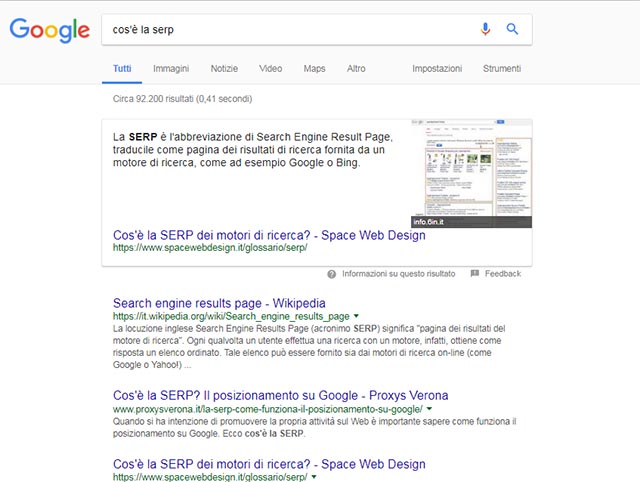
Image from Google.com
Sitelinks
When someone searches for an exact domain, Google may display an expanded pack of up to 10 sitelinks. The full sitelinks pack occupies five organic positions, dominating the SERP.
Sitelinks can benefit your site by:
- Generating a higher CTR from the SERP
- Getting people to the page they’re after faster
Tweets
In 2015 Google began displaying tweets directly in the SERP, mixed in with organic results. Unlike Google+ results, Twitter results don’t appear to require or be affected by personalisation.
Video
Video results (YouTube in particular) may display a thumbnail. They used to be a true vertical, but these days they’re more of an organic enhancement.
By now you should understand what the SERP is and how it works. If you have any doubts or questions, comment on the article or get in touch!
Improving your SERP position: a few useful tools
Improving where you rank in the SERP isn’t impossible, but it is fairly involved. You need solid SEO knowledge and the help of SEO tools, which have become essential to any SEO programme.
The best one?
SEMrush, without much doubt (here it is) — a very complete tool that helps across a range of SEO tasks.
If you’re only interested in the Italian market, the tool we’d recommend is SEOZoom (here’s the official site).
Conclusion
In this article you’ve learned what the SERP is and what it’s made of. You’re ready to start climbing Google’s SERP. In the other lessons of our SEO Academy you’ll find plenty more that will help with your SEO project.
Want to optimize your site, get found by your customers on Google and beat the competition? Get in touch! We’ll work out the best SEO strategy to finally do what you haven’t managed so far.
Want to sharpen your SEO knowledge? Get in touch! We’ll find the right course for you.
Want to ask us something or just talk to us? Get in touch! That’s what we’re here for.